
Site user support in Viedoc
Introduction
At Viedoc we are always all-in for the pursuit of superior customer experience. We look for ways to streamline your processes. We pride ourselves on challenging the status quo and innovating solutions that make your trials run as smoothly as possible.
An important part of our approach is to help site and study users with self-sufficiency when it comes to their user support issues. Traditional user support with a centralized helpdesk is known to be cumbersome when it comes to solving minor technical issues quickly. A critical downfall being centralized helpdesks often lack specific knowledge of your specific study protocols and relationships with particular sites. This results in complex and time-consuming workflows—made even more cumbersome if the helpdesk is in a different time zone.
In this article, we explain how Viedoc will help your organization support sites in a more efficient way than other systems. We show how you will save time and money and get a better user experience with our approach, and further, also show how our approach provides superior protection for your data privacy and data integrity concerns.
Take control with Viedoc Admin
A large part of Viedoc's approach to simplifying support processes is the Viedoc Admin application. This provides a more flexible solution for site and user management, enabling users already connected to the site to resolve common issues quickly, freeing them up for more important tasks.
Within Viedoc, we have certain roles with certain powers. Leveraging the power of the Site Manger system role means that instead of delays disrupting workflows waiting on a helpdesk, a Site Manager can add new users, reset a password, or reject user access directly.
In practice, this means that a monitor with Site Manager powers can be self-sufficient for all their sites, with control over each user's status and activity. There will be no more waiting on a helpdesk. Our clients can even appoint one or several study and site managers to each project with direct access to Viedoc Admin, giving your studies maximum flexibility. Another advantage of empowering the monitors is that sites will have instant access to someone with expert knowledge of the study protocol who speaks the local language and has a personal relationship with the site.
Empower your monitors to save time
Any person or department administering access to a system containing clinical trial data needs to make sure that the correct users are given the correct access every time. This is critical to ensure data privacy in your trials.
A centralized helpdesk has no personal relationship with the users in a study and can only blindly follow instructions provided to them. Say a sponsor gives the helpdesk a list of sites and users in advance, it is crucial that this list contains no errors. A helpdesk wouldn’t be able to catch these errors because they aren’t familiar with the details of your studies, they must take what you give them. This list also needs to be maintained as the study progresses and more sites and users are added. The sponsor or CRO (Contract Research Organizations) will also need to perform periodic access review to revoke access for users who no longer should have it.
These problems show that it is not possible to fully outsource user management to a centralized helpdesk. Several sponsor users, often the monitors, still need to feed information to helpdesk, for example, about who should be granted access, in what role, and when that access should be revoked. The helpdesk is also required to maintain detailed records of all requests.
In contrast, with Viedoc Admin, the site manager is empowered to manage users directly in the system instead of requesting support from the centralized helpdesk or updating their user account lists.
User invitations and access are automatically tracked in the system to make sure all the documentation you need can be exported at the click of a button. This means that there is less administration when you no longer need to maintain separate documentation. Our customers tell us that being empowered to manage users themselves saves them time and puts them in control. Viedoc’s solution leads to quicker and smoother site user support!
Information security
User Administration by the people who know the users
Providing adequate support regarding system access and study-related questions requires knowledge of the next user level in the support chain and the study protocol. This is also important from a privacy regulation and information security perspective.
Viedoc is designed to eliminate the need for a centralized helpdesk which typically struggles with these critical perspectives.
When a user reaches out to a centralized helpdesk, how can they ensure the person is who they are claiming to be? One common stunt involves a hacker making a phone call to an organization’s helpdesk, pretending to be an end user, and asking for a password reset. If the hacker can convince the helpdesk technician to reset the user’s password, then the hacker is able to gain access to the account. This can compromise your entire study. So, a centralized helpdesk must take rigorous security measures to ensure their procedures prevent such malicious attempts.
In Viedoc this risk is significantly reduced since the site manager has a personal relationship with, and knowledge about, the end users attached to your studies.
Sharing privacy details of all users to a centralized helpdesk, situated on the other side of the world, can often compromise compliance with privacy regulations, causing unnecessary problems for your study in the future.
Least privilege access enforced
Centralized helpdesk staff would typically be a “master user”, with access to invite users to many different studies, sites, and users. A single mistake in the information provided to the helpdesk, or in the user management from helpdesk itself, has the potential to significantly impact the entire study. For example, a user could inadvertently get access to either blinded information, or information from another site or study.
Viedoc Admin is designed to give admin users only the access they need according to the principle of least privilege. This is an information security concept which maintains that a user or entity should only have access to the specific data, resources, and applications needed to complete a required task.
For example, a site manager would only be able to invite users to that specific site and only invite users to the selected and relevant roles. As they have a personal relationship with the user, the site manager is also less likely to invite the incorrect user.
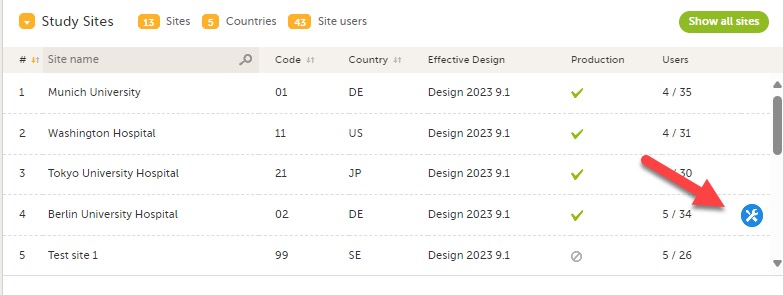
The study manager, which is another system role with additional access compared to the site manager, has full control over what roles can be managed by the site manager, and what sites which site manager should be able to manage. Thus, segregation of duties is completely built into the system.

Mitigates security breaches
In addition to mistakes or obsolete lists, a centralized helpdesk could increase your exposure to a security breach or malicious act which could compromise the whole study.
Study data is obviously unbelievably valuable. An employee at the centralized helpdesk may be incentivized by a third-party malicious actor to disclose study results by giving unauthorized access.
With the Viedoc approach, the risk of a security breach or malicious act occurring is reduced. Leveraging the power of user roles in the system, the impact of a potential security breach or malicious act will also be reduced due to the principle of least privilege.
Thus, the Viedoc approach to site user support is safer! It decreases the risk for data privacy breaches and data integrity issues in the study.
Support model backed up by real data
The reason why we can be so confident with our approach to site user helpdesk is that we have tried the alternative. Very few EDC vendors, if any, can say they have experience from running an EDC platform with a centralized helpdesk AND another EDC platform where end-user support is handled by the customer and the study organization through self-service functionality and built-in user support functions.
Our vision for site user support is confirmed by our metrics; for comparison, in our legacy system we used a centralized helpdesk, we found that 91% of helpdesk tickets were related to issues with administration that the users would have preferred to resolve themselves but had no means of doing so.
In the latest version, Viedoc has embedded support for the users to manage all these tasks themselves. And a superior, more user-friendly system with better documentation leads to fewer broad questions about the system. The remaining 9% of helpdesk tickets were often study-specific and something that a centralized helpdesk, without insight to study specific details, would be unable to help a user with and eventually would need to forward to the study team.
With Viedoc Admin, Viedoc has implemented features designed to empower users to help themselves. In other systems, some of these features would require support from the helpdesk, for example, adding sites, managing access, anonymizing privacy data in the audit trail, generating logs of users, communication logs, and generating other documents.
Another component of our overall support success story is Viedoc's eLearning user documentation, which provides direct access to in-depth information about every aspect of the system. The eLearning documentation is updated with every release and is synchronized with the software releases. The eLearning documentation is also translated into Japanese and Simplified Chinese.
Want to know more about how we support sponsor users? Click here and we will be happy to explain more.