
Customizing a template
Note! This page contains information and instructions for the new TMF user interface. If you are using the old interface, please go to the relevant user guides:
- Viedoc eTMF User Guide (old interface)
- Viedoc User Guide for eTMF Managers (old interface)
Want to browse more information for the new interface? Please go to the new TMF user guides:
Introduction
The TMF template is an Excel file which defines which zones, sections, and artifacts that your TMF will have, as well as the permissions associated with the TMF user roles. The eTMF Manager has permission to import, select, instantiate, export, rename, and delete templates.
In Viedoc TMF, there are two types of templates:
- Organization template - available for all studies within your organization
- Study template - available only for the specific study
With your Viedoc TMF license, a baseline template is provided (see Viedoc-provided templates).This template is not intended to be used as it is, but to be adapted to your organization's needs. For example, you can customize, add, or delete zones, sections, and artifacts.
Requirements for customizing templates
However, the following requirements must be fulfilled for Viedoc TMF to successfully validate the template:
- The template must include nine sheets, in any order.
- The sheet names must not be changed.
- All columns in all sheets are mandatory, which means that they must be present. However, some columns can be left empty. For more information, see the following sub-sections.
- Some columns must include specific values. For more information, see the following sub-sections.
- All sheets must have the same number of rows, that is one row per artifact.
Note! If the following special characters (\/:*?<>|"\r\n) are used in the TMF template, they will be replaced by an underscore (_) during archive generation to ensure the archive completes successfully.
Navigating to templates
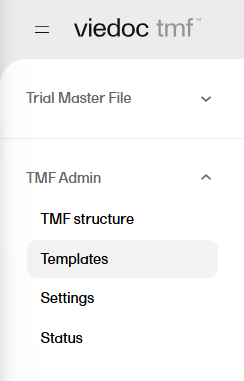
To access the templates in Viedoc TMF, in the left navigation menu, select to expand TMF Admin, and select the Templates page:
The sections below describe the specific sheets found in the TMF template spreadsheet.
The V 3.2.1 sheet
This sheet is based on the TMF Reference Model. Zones, sections, and artifacts can be customized, added, and/or deleted.
These are the requirements for the columns:
| Zone # | Must be unique |
| Zone Name | Must be unique |
| Section # |
Must be unique It consists of two digits that represent the zone number that the section belongs to, followed by a separator and the section number. |
| Section Name | Must be unique within the zone |
| Artifact # |
Must be unique It consists of two digits that represent the zone number, followed by a period (.), then two digits for the section number, a period (.) and the artifact number. Example: |
| Artifact name | Must be unique within the section |
|
Alternate names (artifact also commonly known as) |
This is an alternative name for the artifact. This column is optional. If it exists, its value can be left empty. Note! This column is not currently mapped to system functionality. It is not currently possible to change it in maintenance mode. |
| Definition / Purpose |
A free-text description of the artifact To view the definition in Viedoc TMF: In the left navigation menu, select to expand TMF Admin, and select the TMF Structure page. Navigate to the artifact, and select View. 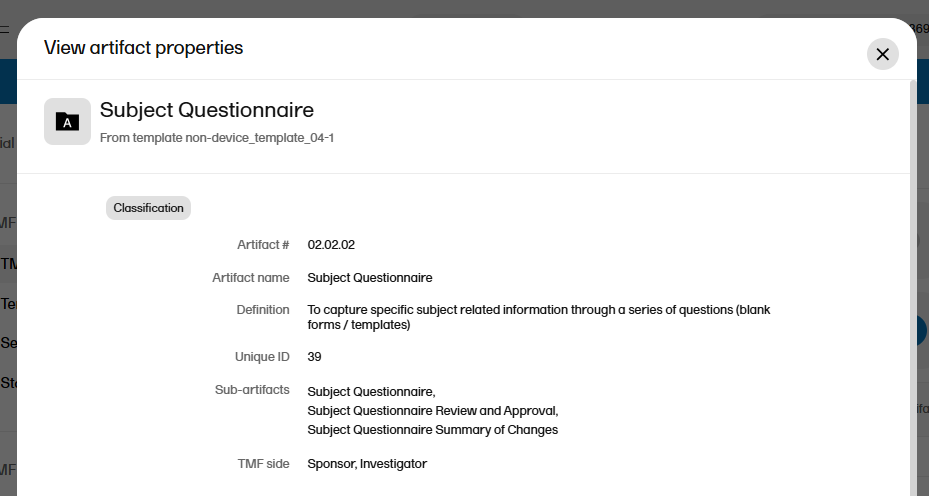
This column must have values. |
| Sub-artifacts |
A newline-separated list of sub-artifacts To view the list of sub-artifacts in Viedoc TMF, see above. Sub-artifacts can be used by TMF users to further classify records. This column can be left empty. |
|
Core or Recommended for inclusion ICH Code |
These columns are related to GCP. These columns can be left empty. Note! This column is not currently mapped to system functionality. It is not currently possible to change it in maintenance mode. |
| Unique ID Number |
An optional unique ID number for the artifact. This number is validated as follows by Viedoc TMF:
|
|
Sponsor Document Investigator Document |
These columns define what side of the TMF the artifact is: sponsor or investigator (according to GCP). The values can be These columns must have values. From Therese: maybe add info that this refers only to archiving, maybe consider a screenshot? Double check with Cecilia |
|
Process Based Metadata - Number Process Based Metadata - Name |
These columns define trial processes that artifacts can be linked to. This can be useful for trials where records are filed across multiple zones. Note! These columns are not currently mapped to system functionality. It is not currently possible to change them in maintenance mode. |
|
Trial Level Document Trial Level MILESTONE/EVENT Country/ Region Level Document Country Level MILESTONE/EVENT Site Level Document Site Level MILESTONE/EVENT |
These columns define which level (Trial/Country/Site) the record should be filed to and which milestones correspond to each. When a Trial/Country/Site level record in the V 3.2.1 sheet in the template is set to:
|
| Dating Convention |
Defines the dating convention that is used in the metadata of records uploaded to Viedoc TMF This column can be left empty. If it is empty, the default dating convention will be the version date. If you select New in the Dating convention field in the Edit artifact window, you can, for example, enter an expiration date as the dating convention. |
The Viedoc extensions sheet
This sheet contains Viedoc-specific properties for each artifact.
These are the requirements for the columns:
| Artifact # | Unique artifact number as defined on the V 3.2.1 sheet. |
| Sign |
This column is not yet used in Viedoc TMF, but it must have values. The following values are accepted: |
| Applicable in Trial |
Defines if the artifact is applicable at trial level. The column must have values. The following values are accepted: |
| Applicable in Country |
Defines if the artifact is applicable at country level. The column must have values. The following values are accepted: |
| Applicable at Site |
Defines if the artifact is applicable at site level. The column must have values. The following values are accepted: |
| Metadata properties |
Additional metadata for the artifact. This column can be left empty. To view the additional metadata in Viedoc TMF: In the left navigation menu, select to expand TMF Admin, and select the TMF Structure page. Navigate to the artifact, and select View. 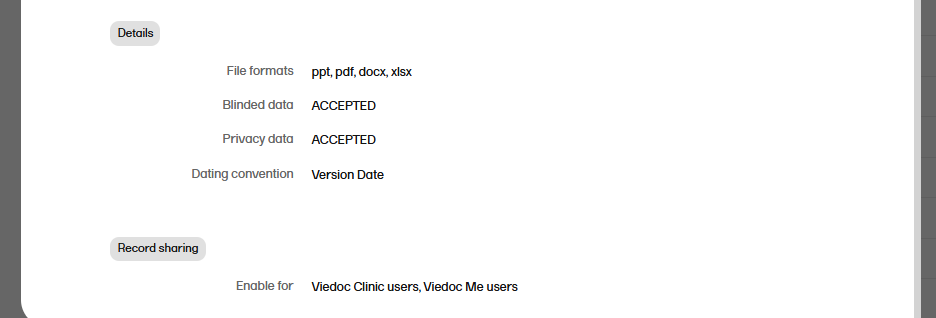 |
| File formats |
A pipe-separated list of accepted file formats for the artifact. Examples:
|
| Accept blinded data |
This column is not yet used in Viedoc TMF. It defines if blinded data is accepted for the artifact. The following values are accepted: |
| Accept privacy data |
This column is not yet used in Viedoc TMF. It defines if privacy data is accepted for the artifact. The following values are accepted: |
The Viedoc milestones sheet
This is an optional sheet. It includes Viedoc-specific properties for each milestone.
If this sheet is not provided, the system will create a list of milestones, under the group Other, based on the following specified milestones in the V 3.2.1 sheet:
- Trial Level MILESTONE/EVENT
- Country Level MILESTONE/EVENT
- Site Level MILESTONE/EVENT
These are the requirements for the columns:
| Id | Unique milestone Id. This column is mandatory. |
| Name | Unique milestone name. This column is mandatory. |
| Group | One of the four milestone groups defined in the CDISC Reference Model. This column is mandatory, and the following values are accepted: Start UP, Study Conduct, Close Out, Other |
| Trial description | Description of trial-level records this milestone includes. This column can be left empty. |
| Country description | Description of country-level records this milestone includes. This column can be left empty. |
| Site description | Description of site-level records this milestone includes. This column can be left empty. |
Role sheets
The role sheets define the permissions associated with each of the TMF roles.
These are the role sheets:
- Role SPONSOR-STUDY
- Role SITESTAFF
- Role SPONSOR-COUNTRY
- Role SPONSOR-SITE
- Role SPONSOR-REVIEW
- Role SPONSOR-DM
- Role SPONSOR-UNBLINDED
These are the requirements for the columns:
| Artifact # | Unique artifact number as defined on the V 3.2.1 sheet. |
| Study |
Defines the permission of the role on study/trial level. The following values are accepted:
|
| Country |
Defines the permission of the role on country level. The following values are accepted:
|
| Site |
Defines the permission of the role on site level. The following values are accepted:
|