
PDF export output
Introduction
When choosing PDF as output format, you have the following options:
- Exclude deleted subjects / events / forms - if checked, the deleted subjects, events and forms will be excluded from the PDF export.
- Create PDF/A compliant archive - if checked, the PDF export output will be in a Portable Document Format Archive (PDF/A) compliant format. The PDF/A is a standardized format specialized for long-term preservation of electronic documents.
- Embed complete fonts (no subsets) - if checked, this will force embedding the complete fonts (not only subsets) into an archive and all the font subsets embedded in the PDF file will be replaced with fully embedded fonts.
Note! Please note that this will lead to significantly larger file sizes. - FDA submission format (eCTD) - if checked, the PDF export output will be structured according to the electronic Common Technical Document (eCTD) format specified by the Food and Drug Administration (FDA). The eCTD format provides a structure where the Case Report Forms (CRFs) are listed twice, ordered by event/workflow and ordered by domain.
Notes!
- For non-production data, the number of subjects in the PDF archive are limited to improve performance. The most recently added subjects are included according to the date the subject card was created. An information message is displayed: For this mode the PDF Archive is limited to a sample of [X] subjects.
- Visit date form history will not be included in the PDF export if no forms were filled in, or if forms were initiated from Viedoc Me.
- In the PDF/A export output, the header, footer, and the text on the respective Contents page are missing for the deleted forms/events/subjects
- In the PDF export output, each event should have a Contents section. The Contents list can in some scenarios be truncated and not show everything for the event.
Output file(s)
One .zip file is downloaded for each PDF export performed.
PDF file structure/content
This section describes the structure of the exported PDF file.
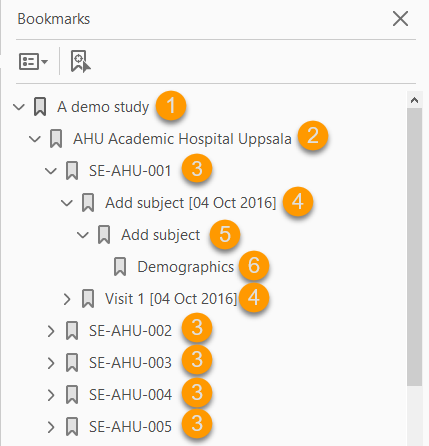
The file is structured as follows:
1. A study summary on the first page.
2. A site summary page.
3. One separate sub-section for each subject in the respective site.
4. For each subject, one sub-section for each event.
5. For each event, one sub-section for each activity.
6. For each activity, one sub-section for each form. The latest version of the form PDFs are included here. See also Audit trail and Form History section in Entering/editing data.
The meaning of the signature in Viedoc is included on the last page.
Note! If the number of forms for a site exceeds 1000, the system splits the archive into one PDF file per subject and stores them in a zip file.
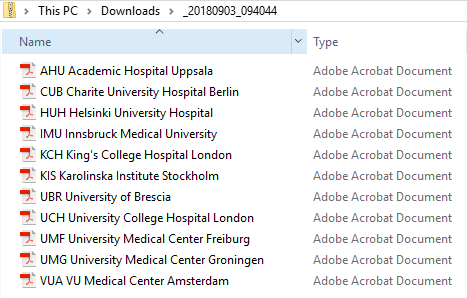
- One separate PDF file is generated for each site and all the PDFs are archived in a .zip file.
The PDF file names reflect the site code and site name, as set in Viedoc Admin, under site settings.
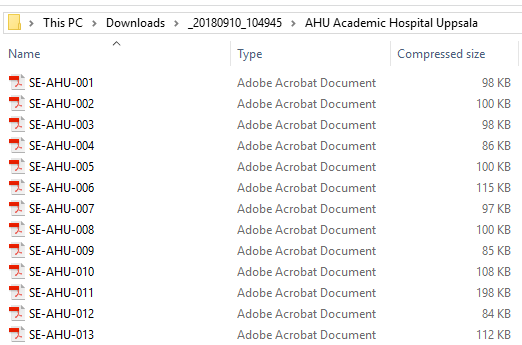
- For the FDA submission format (eCTD), there is one folder for each site, and each folder contains one separate PDF file for each subject (file name is the same as the subject ID):
-
First page
The first page provides a short summary, as illustrated in the image and explained below:
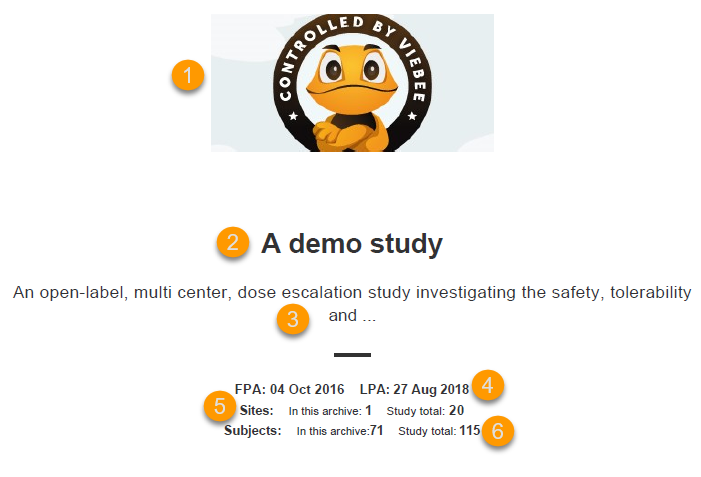
1. The study logo image, if any, as set in Viedoc Admin, under Study Settings.
2. Study name, as set in Viedoc Admin, under Study Settings.
3. Study description, as set in Viedoc Designer.
4. The dates for:
5. The number of sites:
6. The number of subjects:
Site summary page
The site summary page provides a summary of the site, as illustrated in the image and explained below:
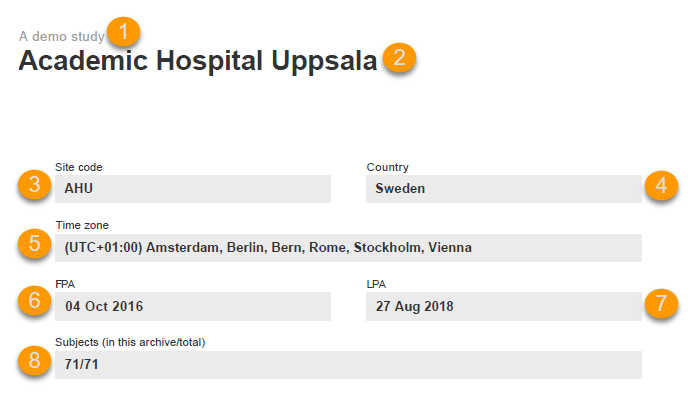
1. The study name, as set in Viedoc Admin.
2. The site name, as set in Viedoc Admin.
3. The site code, as set in Viedoc Admin.
4. The country for the respective site, as set in Viedoc Admin.
5. The site time zone, as set in Viedoc Admin.
6. Date of First Patient Added (FPA) to the site, in the site timezone.
7. Date of Last Patient Added (LPA) to the site, in the site timezone.
8. Number of subjects from the site included in the export / total number of subjects in the site (this number will exclude deleted subjects if Exclude deleted subjects/events/forms is checked).
Following the site summary page, comes a Contents list of the subjects included in the export for the respective site, with the Subject ID and corresponding pages. After that, comes one sub-section for each subject, described in the next topic.
Subject summary page
The subject summary page provides the following information:
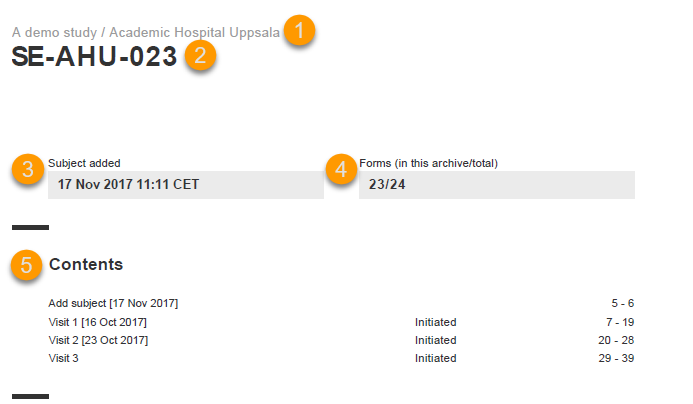
1. The study name and site name, as set in Viedoc Admin.
2. Subject ID in the format set in Viedoc Designer.
3. The date and time the subject was added.
4. The number of Forms filled in / the total number of forms for that subject.
5. A table of Contents with a list of all the events that contain data for the respective subject, the event status and the page numbers where the data related to the respective event can be found.
Event summary page
The event summary page provides the following information:
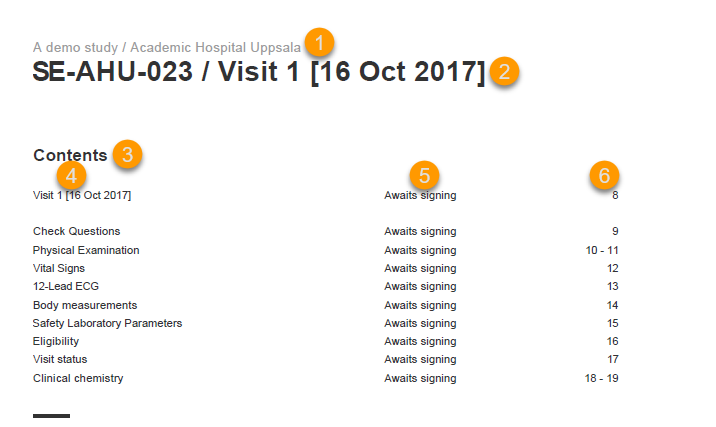
1. The study name and site name, as set in Viedoc Admin.
2. Subject ID in the format set in Viedoc Designer and the event name together with the date when it was initiated.
3. A table of Contents with a list of all the forms within the respective event for Scheduled and Unscheduled events, providing the following information:
For Common Events, each entry will have its own Event summary page.
For each form, the form PDF is included, in the same format as for the form history pdf file. For details, see Form history PDF in Entering/editing data.
The sort order of the forms
The forms in the PDF are sorted by these characteristics:
The following example illustrates the sort order.
Suppose the study design looks like this:
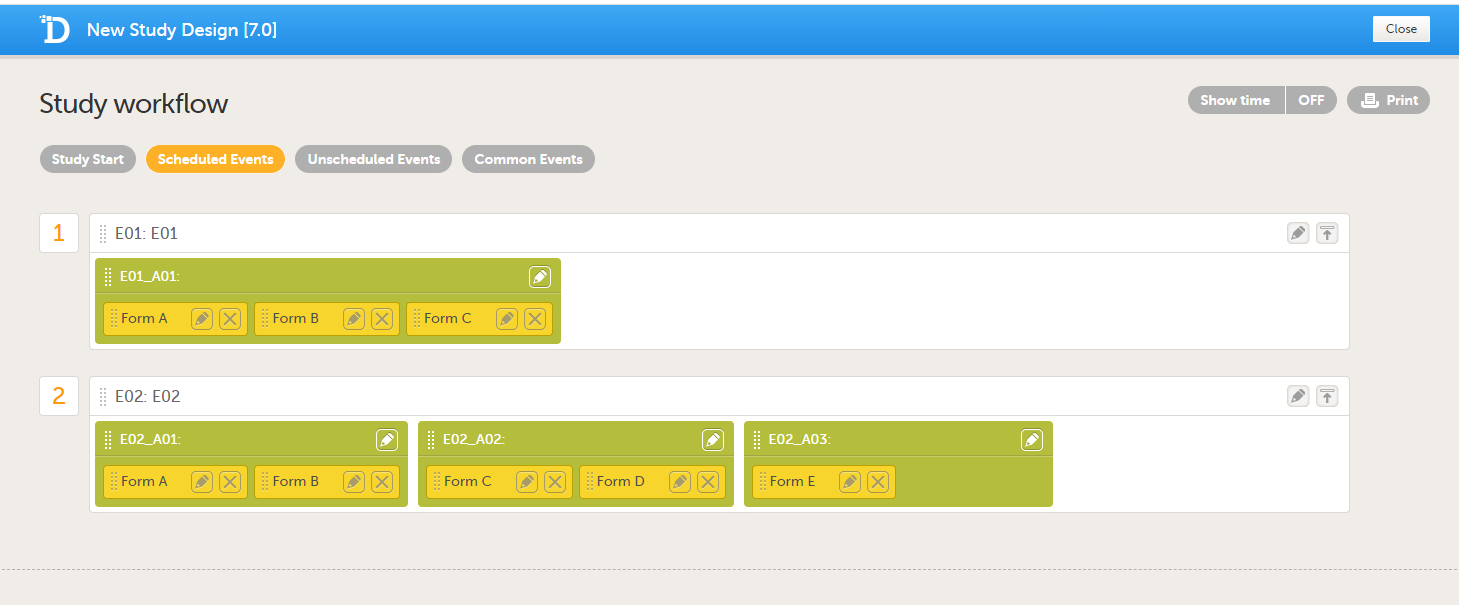
For the event E01, all forms belong to the same activity. This means that the order of the forms in the PDF will always be like this:
For the event E02, there are three activities. This means that if any form from A02 gets saved first, then any form from A01 gets saved second, and then any form from A03 gets saved third, the order of the forms will be:
In other words, the order of forms for event E02 for this specific example will be like this:
- First Patient Added (FPA) in the study
- Last Patient Added (LPA) in the study
- In this archive - the number of sites selected to be included in the export.
- Study total - the total number of sites in the study.
- In this archive - the number of subjects selected to be included in the export.
- Study total - the total number of subjects in the study.
- Form name (4)
- Status (5) - one of the following, depending on if the form was signed by the site:
- Awaits signing
- Signed, followed by the name of the user who has signed and the timestamp (in site timezone).
- Page numbers (6) where the respective form can be found.
- Subject key, in ascending order
- Event type (scheduled, unscheduled, common)
- Date - the date of the first form save of the activity
- The order of the forms according to the study design
- Form A
- Form B
- Form C
- All forms from A02 according to the design
- All forms from A01 according to the design
- All forms from A03 according to the design
- Form C
- Form D
- Form A
- Form B
- Form E