
Converting an ATC dictionary from Excel format to ASCII format
To convert an Anatomic Therapeutic Chemical classification system (ATC) dictionary:
| 1 | Open the xlsx file in Microsoft Excel. |
| 2 | Sort the contents of the file by column A, on cell contents, and in the order A to Z. |
| 3 |
If Defined Daily Dose (DDD) is included in the file (columns C, D, E, and F), delete these columns, as well as the note column if there is one. 
|
| 4 |
Insert a new column B. 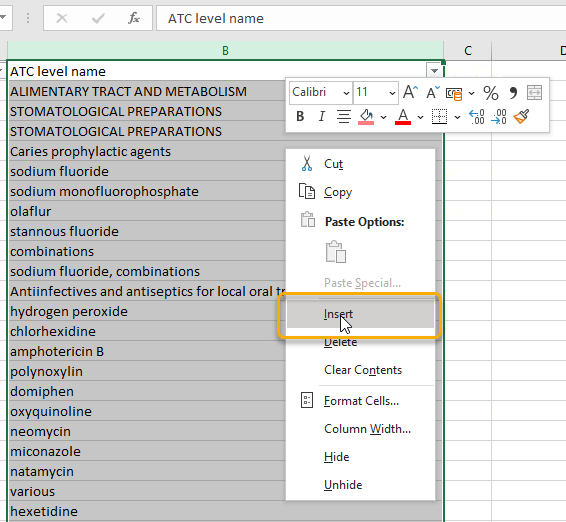
|
| 5 |
In cell B2, write a formula. To add a formula, start by typing an equal sign ( The formula will look different depending on the language of your Excel installation. These are some examples:
Note! Depending on the regional settings in your operating system, you might need to replace the semicolons with commas. 
|
| 6 |
Fill all cells in the B column with the same formula, for example by dragging the small plus sign ( 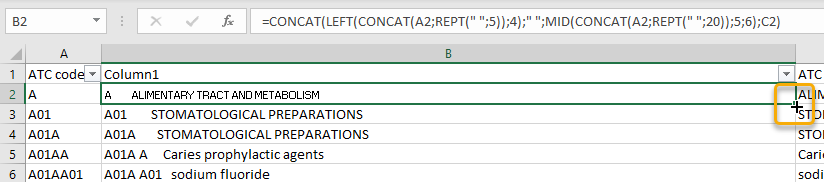
|
| 7 |
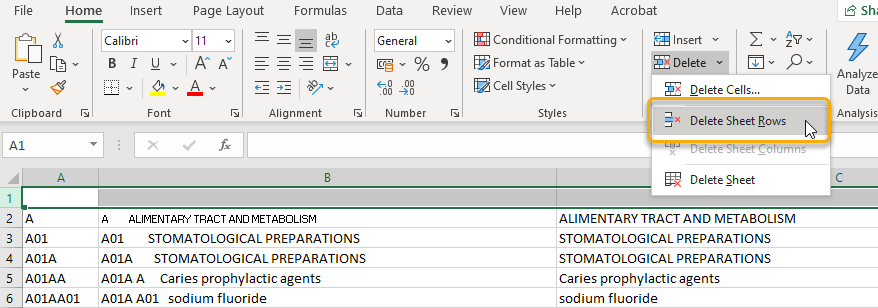
Remove row 1 (the header row). Do to this, you might first need to turn off the header row on the Table Design page.
|
| 8 |
Select column B and copy it. 
|
| 9 | Paste the copied column into a raw text editor such as Windows Notepad. It is important to use an editor that does not add any formatting. |
| 10 |
In the raw text editor, search for the quotation mark character ( 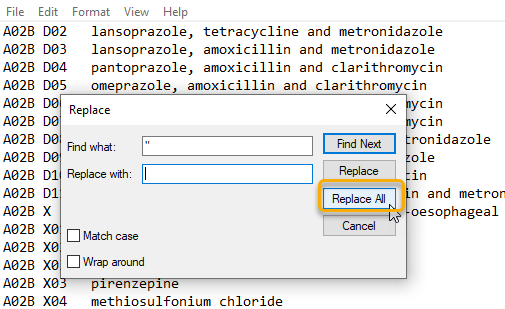
|
| 11 |
If there are empty lines at the end of the file, remove them. 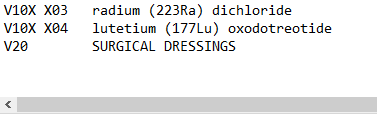
|
| 12 | Save your file with an appropriate filename that reflects the ATC version and with the filename extension asc. |
| 13 | Upload the file to Viedoc according to these instructions: Creating a dictionary instance. |
